REST API
Releval's REST API provides a traditional integration path for web-based applications.
OpenAPI specification
You can download the OpenAPI specification from the website.
This specification provides a comprehensive overview of the available endpoints, request/response formats, and authentication requirements.
You can use the OpenAPI specification with tools of your choosing like Insomnia or Postman.
- Download the OpenAPI JSON file.
- Import the file into your tool of choice, like Insomnia or Postman.
- Start making API calls directly from the tool.
API reference
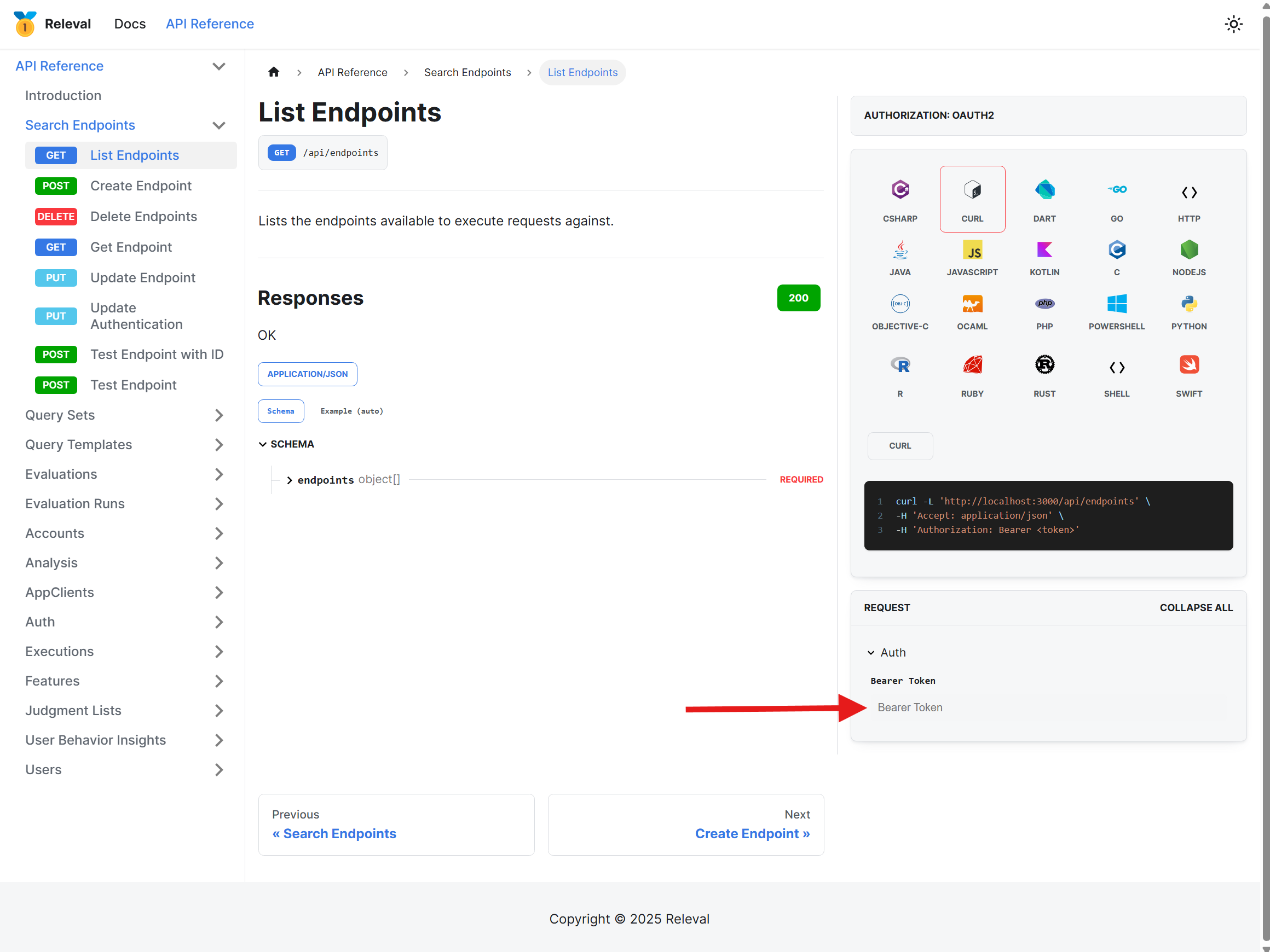
If you'd like to try the REST APIs live in your browser, the API reference allows you to make API calls. You'll need a valid JWT token to do so. Insert the token into the page and click the SEND API REQUEST button:
Authentication
Releval uses Bearer tokens to authorize requests, which are obtained
using the OAuth 2.0 Client Credentials Flow, using the client_id and
client_secret generated upon creating an app client. Consult the OAuth documentation for steps
on how to create tokens.
Releval expects the Bearer token to be included via the HTTP Authorization
header in all API requests to the server. When using curl, it looks like the following:
curl -H 'Authorization: Bearer <token>' https://app.releval.co/api/endpoints
Here's an implementation of a DelegatingHandler for C# HTTP clients that can be used to get access tokens on demand when making requests.
- OAuth2Handler
- OAuth2TokenService
// Copyright 2025 Releval
//
// Licensed under the Apache License, Version 2.0 (the "License");
// you may not use this file except in compliance with the License.
// You may obtain a copy of the License at
//
//     http://www.apache.org/licenses/LICENSE-2.0
//
// Unless required by applicable law or agreed to in writing, software
// distributed under the License is distributed on an "AS IS" BASIS,
// WITHOUT WARRANTIES OR CONDITIONS OF ANY KIND, either express or implied.
// See the License for the specific language governing permissions and
// limitations under the License.

using System.Net.Http.Headers;

namespace Releval;

public class OAuth2Handler : DelegatingHandler
{
    private readonly OAuth2TokenService _tokenService;

    public OAuth2Handler(OAuth2TokenService tokenService, HttpMessageHandler innerHandler) : base(innerHandler) =>
    _tokenService = tokenService;

    protected override async Task<HttpResponseMessage> SendAsync(HttpRequestMessage request, CancellationToken cancellationToken)
    {
        var token = await _tokenService.GetAccessTokenAsync(cancellationToken).ConfigureAwait(false);
        request.Headers.Authorization = new AuthenticationHeaderValue("Bearer", token);
        return await base.SendAsync(request, cancellationToken).ConfigureAwait(false);
    }
}
// Copyright 2025 Releval
//
// Licensed under the Apache License, Version 2.0 (the "License");
// you may not use this file except in compliance with the License.
// You may obtain a copy of the License at
//
//     http://www.apache.org/licenses/LICENSE-2.0
//
// Unless required by applicable law or agreed to in writing, software
// distributed under the License is distributed on an "AS IS" BASIS,
// WITHOUT WARRANTIES OR CONDITIONS OF ANY KIND, either express or implied.
// See the License for the specific language governing permissions and
// limitations under the License.

using System.Text.Json;
using Grpc.Core;
using Microsoft.Extensions.Logging.Abstractions;

namespace Releval;

/// <summary>
/// Retrieves and refreshes access tokens for OAuth2.0 authentication
/// </summary>
/// <remarks>
/// The service retrieves an access token on the initial request and
/// reuses the token for subsequent requests. An asynchronous background task
/// waits until 30 seconds before the access token expires and refreshes it.
/// </remarks>
public sealed class OAuth2TokenService : IDisposable
{
    private static readonly JsonSerializerOptions JsonSerializerOptions =
        new() { PropertyNamingPolicy = JsonNamingPolicy.SnakeCaseLower };

    private static readonly TimeSpan ThirtySeconds = TimeSpan.FromSeconds(30);
    private readonly HttpClient _client;
    private readonly KeyValuePair<string, string>[] _nameValueCollection;
    private readonly SemaphoreSlim _semaphore;
    private readonly CancellationTokenSource _cancellationTokenSource;
    private readonly ILogger _logger;
    private readonly Uri _authenticationEndpoint;
    private Task? _refreshTokenLoop;
    private DateTime _expiresIn;
    private bool _disposed;
    private volatile string? _accessToken;

    /// <summary>
    /// Instantiates a new instance of <see cref="OAuth2TokenService"/>
    /// </summary>
    /// <param name="clientId">The client Id</param>
    /// <param name="clientSecret">The client secret</param>
    /// <param name="authenticationEndpoint">The authentication endpoint</param>
    /// <param name="loggerFactory">A logger factory through which to log messages.</param>
    /// <param name="client">A client used to fetch access tokens.</param>
    /// <exception cref="ArgumentNullException">
    /// Thrown if <paramref name="clientId" /> or <paramref name="clientSecret"/> are null.
    /// </exception>
    public OAuth2TokenService(
    string clientId,
    string clientSecret,
    string authenticationEndpoint,
    ILoggerFactory? loggerFactory = null,
    HttpClient? client = null)
    {
        if (clientId is null)
            throw new ArgumentNullException(nameof(clientId), "clientId must not be null");

        if (clientSecret is null)
            throw new ArgumentNullException(nameof(clientSecret), "clientSecret must not be null");

        if (authenticationEndpoint is null)
            throw new ArgumentNullException(nameof(authenticationEndpoint), "authenticationEndpoint must not be null");

        _authenticationEndpoint = new Uri(authenticationEndpoint);
        _client = client ?? new HttpClient();
        _nameValueCollection =
        [
            new KeyValuePair<string, string>("grant_type", "client_credentials"),
            new KeyValuePair<string, string>("client_id", clientId),
            new KeyValuePair<string, string>("client_secret", clientSecret)
        ];
        _semaphore = new SemaphoreSlim(1, 1);
        _cancellationTokenSource = new CancellationTokenSource();
        _logger = loggerFactory?.CreateLogger("Releval.Client") ?? NullLogger.Instance;
    }

    /// <summary>
    /// Gets an access token to authenticate to platform.
    /// </summary>
    /// <param name="cancellationToken">The cancellation token to cancel operation.</param>
    /// <returns>An access token to include in the Authorization header</returns>
    public async Task<string> GetAccessTokenAsync(CancellationToken cancellationToken = default)
    {
        if (_accessToken is null)
            _accessToken = await InitializeAccessTokenAsync(cancellationToken).ConfigureAwait(false);

        return _accessToken;
    }

    private async Task<string> InitializeAccessTokenAsync(CancellationToken cancellationToken = default)
    {
        await _semaphore.WaitAsync(cancellationToken).ConfigureAwait(false);

        try
        {
            if (_accessToken is not null)
                return _accessToken;

            var token = await GetJwtTokenAsync(cancellationToken).ConfigureAwait(false);
            _expiresIn = DateTime.UtcNow.AddSeconds(token.ExpiresIn);
            _refreshTokenLoop = RefreshTokenLoopAsync(_cancellationTokenSource.Token);
            return token.AccessToken;
        }
        finally
        {
            _semaphore.Release();
            _logger.LogDebug("retrieved initial token");
        }
    }

    private async Task RefreshTokenLoopAsync(CancellationToken cancellationToken = default)
    {
        while (!cancellationToken.IsCancellationRequested)
        {
            // wait until up to 30 seconds before the token expires.
            var delay = _expiresIn - DateTime.UtcNow.AddSeconds(30);
            if (delay > TimeSpan.Zero && delay > ThirtySeconds)
            {
                try
                {
                    var maxMillisecondsDelay = Math.Min(delay.TotalMilliseconds, 4294967294);
                    await Task.Delay((int)maxMillisecondsDelay, cancellationToken).ConfigureAwait(false);
                }
                catch (TaskCanceledException)
                {
                    // Cancellation requested, exit the loop.
                    break;
                }
            }

            try
            {
                var token = await GetJwtTokenAsync(cancellationToken).ConfigureAwait(false);
                await _semaphore.WaitAsync(cancellationToken).ConfigureAwait(false);
                try
                {
                    _accessToken = token.AccessToken;
                    _expiresIn = DateTime.UtcNow.AddSeconds(token.ExpiresIn);
                }
                finally
                {
                    _semaphore.Release();
                    _logger.LogDebug("token refreshed");
                }
            }
            catch (OperationCanceledException)
            {
                // Cancellation requested, exit the loop.
                break;
            }
            catch (Exception ex)
            {
                _logger.LogError(ex, "token refresh failed");
            }
        }
    }

    private async Task<JwtToken> GetJwtTokenAsync(CancellationToken cancellationToken = default)
    {
        var request = new HttpRequestMessage(HttpMethod.Post, _authenticationEndpoint)
        {
            Content = new FormUrlEncodedContent(_nameValueCollection)
        };
        var response = await _client.SendAsync(request, cancellationToken).ConfigureAwait(false);
        var content = await response.Content.ReadAsStringAsync(cancellationToken).ConfigureAwait(false);

        if (!response.IsSuccessStatusCode)
        {
            _logger.LogError("ClientId/ClientSecret is invalid. Received response {response}", content);
            throw new RpcException(new Status(StatusCode.Unauthenticated, "ClientId/ClientSecret is invalid."));
        }

        return JsonSerializer.Deserialize<JwtToken>(content, JsonSerializerOptions);
    }

    public void Dispose()
    {
        if (_disposed)
            return;

        _cancellationTokenSource.Cancel();

        if (!_refreshTokenLoop?.IsCompleted ?? false)
            _refreshTokenLoop?.Wait();

        _refreshTokenLoop?.Dispose();
        _client.Dispose();
        _semaphore.Dispose();
        _cancellationTokenSource.Dispose();

        _disposed = true;
    }

    private record struct JwtToken(string AccessToken, int ExpiresIn, string Scope, string TokenType);
}
To use this to construct a HTTP client that will automatically apply bearer tokens:
// Copyright 2025 Releval
//
// Licensed under the Apache License, Version 2.0 (the "License");
// you may not use this file except in compliance with the License.
// You may obtain a copy of the License at
//
//     http://www.apache.org/licenses/LICENSE-2.0
//
// Unless required by applicable law or agreed to in writing, software
// distributed under the License is distributed on an "AS IS" BASIS,
// WITHOUT WARRANTIES OR CONDITIONS OF ANY KIND, either express or implied.
// See the License for the specific language governing permissions and
// limitations under the License.

var address = "https://app.releval.co";
var tokenService = new OAuth2TokenService(clientId, clientSecret, $"{address}/oauth2/token");
var handler = new OAuth2Handler(tokenService, new HttpClientHandler());
var client = new HttpClient(handler);

// use the client
Authorization
When creating an app client, a collection of roles are specified that determine what the app client has access to. These roles are encoded within the JSON Web Token (JWT) bearer token, and can be viewed using jwt.io.
In all cases, if an app client does not have permission to do
something, you'll get a 403 Forbidden error.
Pagination
Some APIs support pagination. Pagination is performed with a page parameter.
You can change the number of items to be returned with the pageSize
parameter. The OpenAPI specification indicates the valid values for each API.
Errors
Releval API uses the following HTTP status codes:
| Code | Text | Description |
|---|---|---|
400 | Bad Request | Your request is malformed in some way. The response usually indicates what's wrong. |
401 | Unauthorized | Your request does not have valid authentication credentials for the operation. |
403 | Forbidden | Your request is not authorized to perform the operation. |
404 | Not Found | The specified resource was not found |
408 | Request Timeout | Your request was cancelled, typically by you. |
409 | Conflict | Your request conflicted with another operation. |
429 | Too Many Requests | You're making too many requests at once. Slow down! |
500 | Internal Server Error | We've got some problem with our service. Please try again later. |
503 | Service Unavailable | We're temporarily offline for maintenance. Please try again later. |
504 | Gateway Timeout | The deadline expired in which to perform the operation specified by your request. |
When API errors occur, it is up to you to retry your request - Releval does not keep track of failed requests.
Error Details
Releval uses RFC 9457 Problem Details to carry machine-readable details of errors in HTTP response content.
A typical example of a general error is:
{
  "type": "https://tools.ietf.org/html/rfc7231#section-6.5.4",
  "title": "Not Found.",
  "status": 404
}
An example of a bad request with validation errors is:
{
  "type": "https://tools.ietf.org/html/rfc7231#section-6.5.1",
  "title": "One or more validation errors occurred.",
  "status": 400,
  "errors": {
    "name": [
      "name is required"
    ]
  }
}
The "errors" field contains an object where the keys indicate which inputs have errors, and the values array for
each key describes the errors. Errors not directly related to inputs are keyed against "" in the "errors" object.
Versioning
The Releval API is versioned. A new API version is released when we introduce a backwards-incompatible change to the API. For example, changing a field type or name, or deprecating endpoints.
While we're adding functionality to our API, we won't release a new API version. You'll be able to take advantage of this non-breaking backwards-compatible changes directly on the API version you're currently using.
Releval considers the following changes to be backwards-compatible:
-
Adding new API resources.
-
Adding new optional request parameters to existing API methods.
-
Adding new properties to existing API responses.
-
Changing the order of properties in existing API responses.
-
Changing the length or format of opaque strings such as object IDs, error messages, and other human-readable strings.
Your integration should gracefully handle backwards-compatible changes.